Six attacks that got past Cloudflare last week

I want to show you something unglamorous but useful: six real attacks, captured on real customer sites, all of which were sitting behind paid Cloudflare plans when they happened. None of them were big enough to make the news. None of them tripped a Cloudflare alert. Most of them would not have looked like attacks at all if you happened to glance at your traffic graph at the wrong moment. But each of them was deliberately designed to do damage to a small or medium website, and each of them succeeded at slipping past the edge.
Before going through the screenshots it is worth spending a paragraph on why these particular attacks slipped through, because the answer is the same for all six and it is not “Cloudflare is bad”. The defenses Cloudflare runs at the request level, the network scrubber, the always-on HTTP DDoS Attack Protection ruleset, Bot Fight Mode or Super Bot Fight Mode, the managed WAF rules, custom rules, and the rate limiter, all evaluate one request at a time. The question each layer asks is “is this request, in isolation, anomalous?” For the kinds of attacks Cloudflare is built to stop, big floods, payload-based exploits, simple bots from cloud hosting providers, that question is the right one. For the attacks below, where every individual request looks fine and the signal only appears when you aggregate across thousands of requests over time, the per-request question cannot answer it.
Cloudflare does have behavioural products that aggregate over time, Bot Management for per-request bot scoring and Adaptive DDoS Protection for traffic-shape deviations, but both live on the Enterprise plan with the Advanced DDoS Protection subscription. For everyone below that line, the per-request question is the only question being asked, and the gap stays open by default.
Now let us look at what falls into it.
The screenshots are from our own dashboard. They are blurry and they are small, and that is fine. The point is what is happening in them, not the design.
1. The cache buster
Cache bypass attack on a single image, with rotating query parameters
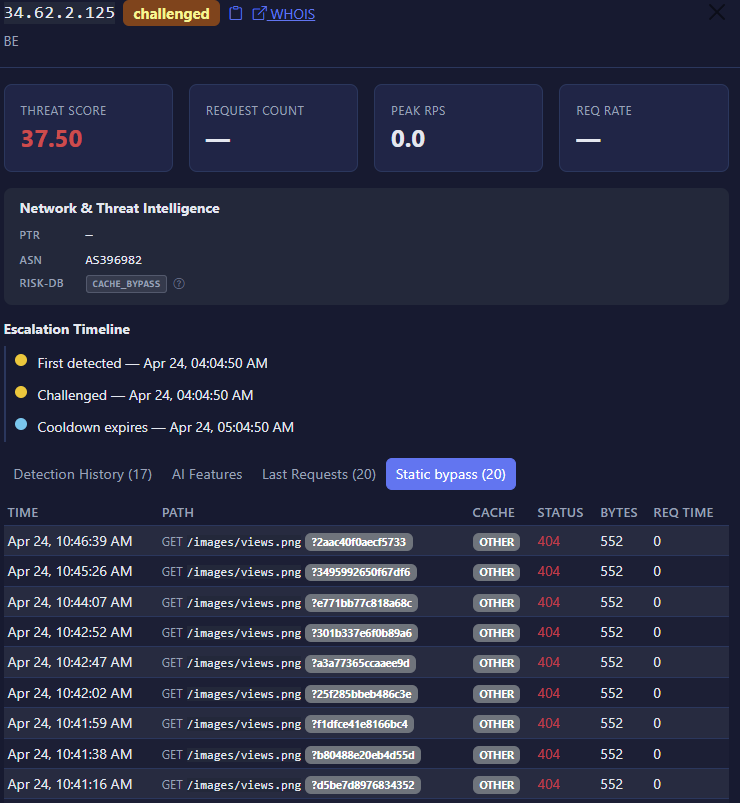
This one is a classic. The attacker picked a single small image on the site, views.png, and started requesting it in a loop. To stop Cloudflare from serving the cached copy, they appended a different random query string to every single request. So the URL looked like
views.png?2aac40f0aecf5733
views.png?3495992650f67df6
views.png?e771bb77c818a68c
...
Each one looked like a new resource to the cache. Each one had to be fetched from the origin.
The point of this attack is not to take your site down with a flood. The point is to make your origin server do work. Every request bypasses the CDN, lands on your hosting, opens a database connection if your stack is dynamic, and consumes bandwidth on your bill. Multiply by ten thousand requests in an hour and you have a quietly expensive Tuesday.
Why this gets through Cloudflare’s per-request layers: every individual request is a perfectly valid HTTP GET for what looks like a different resource. The default cache key includes the full URL with the query string, so to Cloudflare each unique query string is a different cacheable item that needs to be fetched from the origin. There is no payload to flag, so the WAF stays quiet. No rate limit catches it unless you have one configured to fire below the rate of one request per second per source. The behaviour only becomes obvious when you notice that the path stem is always the same and the query strings are random hex, which is a pattern across requests, not within any single one.
2. The small DDoS that never reached the alert threshold
A single IP sending 269 requests per second
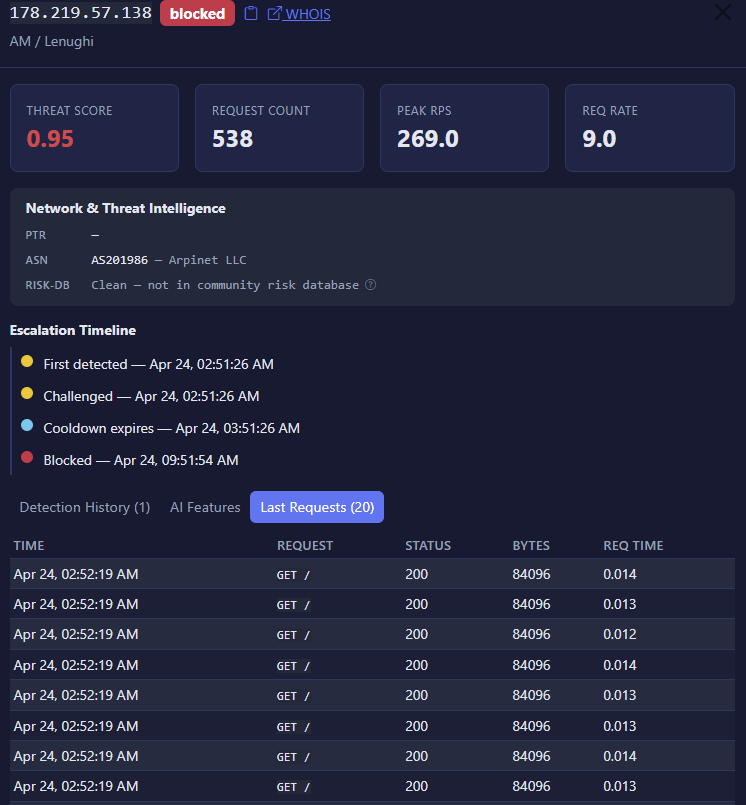
Here is the one most people do not believe is real until they see it. A single IP, no botnet, no clever rotation, just one machine sending 269 requests per second to the homepage of the site. It accumulated 538 requests in the time it took anyone to notice. The IP was clean in every public reputation database we checked.
Why this gets through Cloudflare’s per-request layers: 269 requests per second from a single IP is not a volumetric attack by network-layer standards, so the L3/L4 scrubber does not engage. The HTTP DDoS Attack Protection ruleset is on, but its origin-error-rate rule only triggers above one thousand errors per second by default, and on Pro and above only when the error rate is also at least five times the normal traffic. Every response in this attack was a clean 200, so no errors were generated and no error-rate rule fired. Bot Fight Mode is built to identify simple bots from cloud hosting providers and headless browsers, and a single residential-class IP making clean GET requests does not match those patterns. The requests are plain GETs with no payload, so the managed WAF rules do not match. The only layer that could catch this is the rate limiter, and the rate limiter only catches it if you have a custom rule configured to fire at this exact threshold for this exact path. Most operators do not, because the moment you set a rate limit that low you start blocking legitimate users on busy days.
3. The volumetric flood from a residential ISP
A Starlink residential IP launching a flood, sitting on a clean reputation list
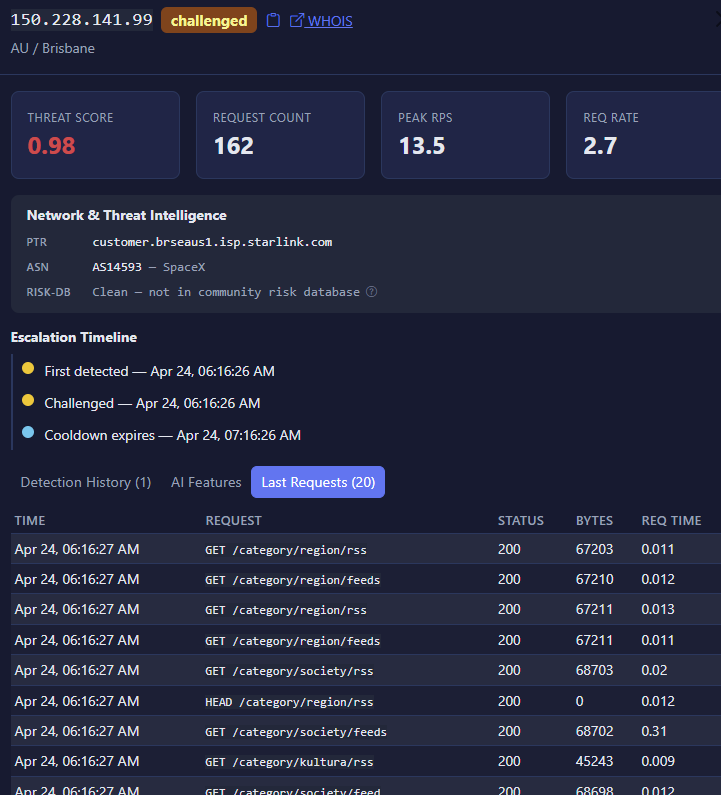
This is a particularly modern problem. The IP in the screenshot is a SpaceX Starlink customer.
Residential IPs are the soft underbelly of every per-request defense on the market. Cloudflare’s free and Pro bot products are tuned for simple bots from cloud hosting providers and headless browsers, not real residential connections, so the requests do not match the patterns those products are looking for. Managed WAF rules find nothing wrong with a clean GET request. Custom rules that block by ASN are useless when the source is a real residential ISP that millions of legitimate users also sit behind. Rate limits at 13 requests per second from one IP would also block any user who refreshes the page a few times in quick succession.
The only way to catch this kind of traffic is to look at what the IP is actually doing across requests. The reputation database says clean. The behaviour says otherwise…
4. The cache buster, more sophisticated version
200 cache-busting requests routed through a Zscaler proxy, all arriving in the same second
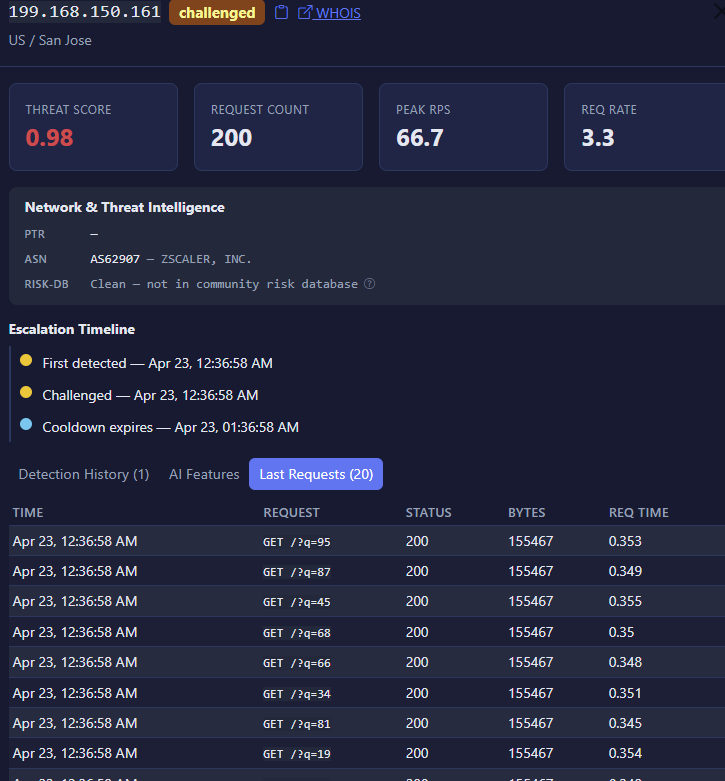
Same general idea as the first one, but cleaner execution. This time the requests came through Zscaler, a corporate proxy network. Two hundred requests, all with a different ?q= parameter to defeat caching, all timestamped at exactly the same second. The bytes column tells you what is going on: each response was 155 KB, multiplied by two hundred requests, hitting the origin in a single second. Roughly thirty megabytes of bandwidth in one second, on a request pattern that no human could possibly produce.
Why this gets through Cloudflare’s per-request layers: Zscaler is a legitimate corporate network. Plenty of real users sit behind it. So an IP-based block is dangerous. Each individual request is structurally valid. There is no injection payload for the WAF to catch. The default cache key includes the query string, so each ?q= value is treated as a different cacheable resource and lands on the origin. The signal is in the temporal pattern across the two hundred requests, which is not what any per-request layer is designed to see.
5. The methodical vulnerability scan
A Microsoft Azure IP probing dozens of PHP and WordPress endpoints in a single second
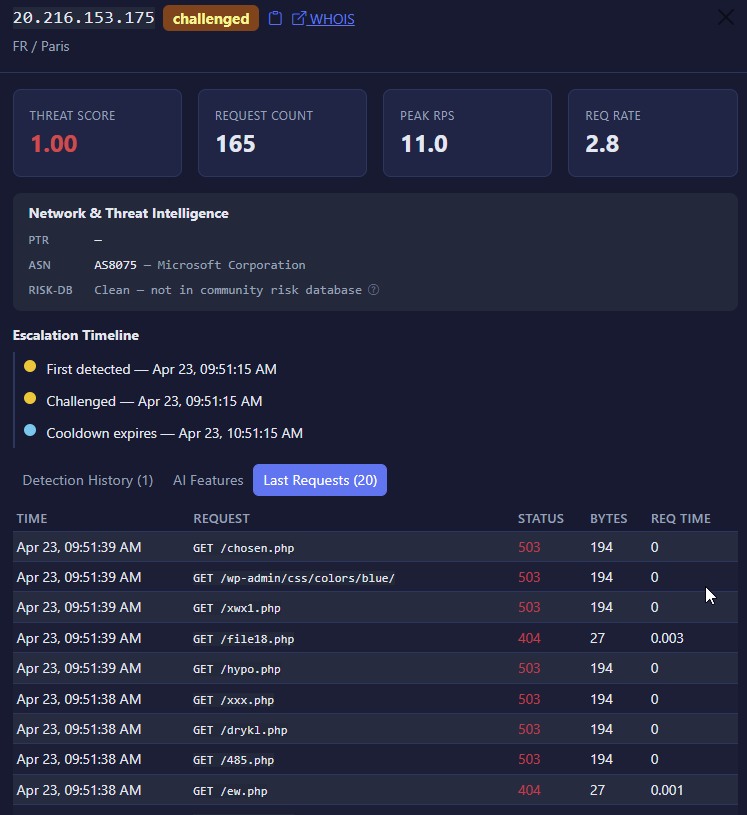
This is a classic vulnerability scan from a cloud IP. The attacker rented a virtual machine on Microsoft Azure and pointed an automated tool at the site. Within a single second the tool requestedchosen.php
wp-admin/css/colors/blue/
xwx1.php
file18.php
hypo.php
xxx.php
drykl.php
485.php
ew.php
and dozens more. None of these files exist on the site. Most returned 503. A few returned 404.
This is not a DDoS. The attacker was not trying to take the site down. They were trying to find a forgotten admin panel, an unpatched plugin, an old debug script, or any other crack in the door. If they had found one, the second wave of traffic would have been very different.
Why this gets through Cloudflare’s per-request layers: the WAF is built to catch attack payloads, SQL injection, cross-site scripting, log4shell-style RCE patterns, but GET /chosen.php is not a payload. It is just a request for a file. There is nothing in the request body, headers, or path that matches a known attack signature, so neither the Cloudflare Free Managed Ruleset, the Cloudflare Managed Ruleset, nor the OWASP Core Ruleset has anything to fire on. The IP comes from a major cloud provider that hosts an enormous amount of legitimate traffic, so an ASN block would cause real damage. The rate is low. The user agent looks normal. Each individual request is invisible. The signal is the concentration: dozens of requests for non-existent endpoints, all in one second, all with the same fingerprint.
This kind of probing is the most common form of malicious traffic on the internet. Most people never see it because it does not register on a traffic graph. It is just a thin layer of constant background noise, hitting every site, every minute.
6. The slow ramp
A traffic graph showing requests doubling from around 5,000 to around 9,000 per minute over forty minutes, then dropping back
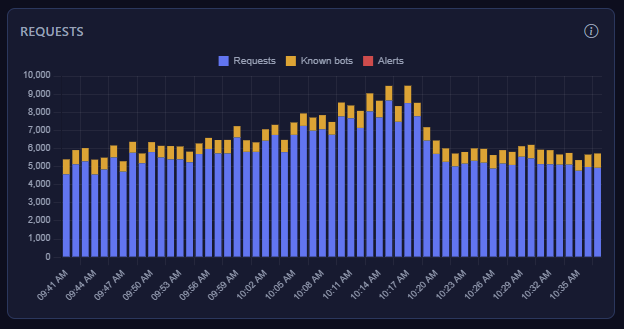
I saved this one for last because it is the most interesting and the hardest to catch. The graph shows traffic on a single site over about an hour. The baseline was around five thousand requests per minute. Over the course of forty minutes the traffic climbed gradually, reaching about nine thousand requests per minute at the peak. Then it dropped back down.
There is no obvious spike in this graph. There is no moment where any sane rate limit would have fired. If you were watching the graph live you might have squinted at it and decided it was just a busy day. The whole point of this pattern is that it does not look like an attack. It looks like growth. Or weather. Or a Reddit thread. It is none of those things. It is an attacker who has read the documentation of every common rate limit on the market and designed their traffic to stay just below the trigger.
Why this gets through Cloudflare’s per-request layers: there is nothing wrong with any single request. The volume is well within what the platform can serve. No threshold is crossed. The only way to call this out is to know what your site’s traffic actually looks like at this hour on this day of the week, and to notice that the current shape is well outside the normal band. That is not a job for a generic edge ruleset. It is a job for something that has been watching your specific site for a while and remembers what last Tuesday looked like.
What the screenshots have in common
If you flip back through the six images, a few things become obvious very quickly.
- None of these IPs were on a public threat list.
- The reputation row in every screenshot says clean.
- None of them came from suspicious geographies.
We have a SpaceX customer in Brisbane, a Microsoft Azure IP in Paris, a Zscaler proxy in San Jose. All places that produce huge volumes of legitimate traffic every second of every day. Blocking any of those sources at the IP or ASN level would also block real users.
None of them were big enough, in raw request volume, to be considered an outage-class event. The biggest single-IP rate in this batch was 269 RPS. Real volumetric DDoS attacks are measured in the millions of requests per second across hundreds of thousands of IPs. These are nowhere near that. They are deliberately small, because small is what flies under the radar.
And every single one of them is a population-level pattern. There is nothing wrong with any individual request inside any of these incidents. The wrongness only appears when you look across requests, over time, against a baseline of what the site normally looks like.
This is the part of web security that nobody puts on a pricing page because it is unglamorous. It is not the headline-grabbing thirty-terabit DDoS. It is the steady drip of small, persistent, well-designed attacks that any reasonably motivated operator can run for almost no cost, and that any reasonably configured edge platform will let through because the alternative is blocking real users.
If you run a site, you have traffic that looks like this in your logs right now. The only question is whether anyone is looking.
And it is a fact that this can slow down your site or make it inaccessible.
What we did about it
For each of the six incidents in this article, the same thing happened. Within seconds of the population-level signal appearing, the offending source was pushed back to the customer’s existing Cloudflare account through a soft challenge. If the source kept misbehaving after the challenge, it was escalated to a full block. The customer did not have to do anything, did not get woken up, did not have to read a single log line.
That is the role we use Detect7 for. It sits next to your Cloudflare setup, watches every request after the fact, learns what your site looks like when nothing is wrong, and acts on the persistent and slow-burn stuff before it becomes interesting. It does not replace any of the per-request defenses you already have. It fills the part of the job that an edge platform was never designed to do.
If you want to see what your own traffic actually looks like, the free tier is enough to find out.